# WooCommerce Slow
**URL:** https://techoforum.com/t/woocommerce-slow/410
**Category:** eCommerce
**Tags:** wordpress, woocommerce
**Created:** [November 28, 2024, 2:05pm UTC](https://techoforum.com/t/woocommerce-slow/410 "2024-11-28T14:05:19Z")
**Posts on this page:** 20
**Page:** 1
### Author:  [@Caleb](https://techoforum.com/u/Caleb)
#### Post date: [November 28, 2024, 2:05pm UTC](https://techoforum.com/t/woocommerce-slow/410/1 "2024-11-28T14:05:19Z")
My WooCommerce shop is too slow to load. Backend is slow, frontend is slow, everything is slow. How to fix it?
---
### Author:  [@Guru](https://techoforum.com/u/Guru)
#### Post date: [November 28, 2024, 2:13pm UTC](https://techoforum.com/t/woocommerce-slow/410/2 "2024-11-28T14:13:58Z")
There could be many reasons why your WooCommerce site is too slow in loading. You have to debug it step by step as described below
**1) Check if host is slow**
Setup and empty WordPress site and check the loading speed for that. If that loads fine then nothing to do with the host. If it loads slow then you will have to move to a new host or increase it’s RAM size to maximum.
If you are using shared hosting then it would be difficult to get any decent improvements. You should consider cloud hosting or dedicated hosting.
**2) Plugins**
Plugins are the most common culprits for slowing down any WordPress site including WooCommerce. Disable all plugins except WooCommerce and check if it loads fine. If not then move to the next step.
**3) Theme**
There may be issue with the theme which may be slowing down WooCommerce. Use WordPress’s default store theme and check if it makes any improvements? If not then move to next step
**4) Disable wp-cron**
If you site is getting a lot of traffic then disable wp-cron and see if it improves page loading.
---
### Author:  [@Caleb](https://techoforum.com/u/Caleb)
#### Post date: [November 28, 2024, 2:20pm UTC](https://techoforum.com/t/woocommerce-slow/410/3 "2024-11-28T14:20:43Z")
Thanks for quick reply.
I don’t have many plugins, I’ve only 7 plugins and all of them are WooCommerce plugins.
I don’t have much traffic either.
I’m using default storefront theme.
I’ve a dedicated hosting and I’ve other WordPress installations on this dedicated host all of them load fine.
I don’t know what else to look for? Any more suggestions?
---
### Author:  [@technuisance](https://techoforum.com/u/technuisance)
#### Post date: [November 28, 2024, 2:29pm UTC](https://techoforum.com/t/woocommerce-slow/410/4 "2024-11-28T14:29:53Z")
Looks like your case is complex then.
Check product Image sizes, if they are large reduce their sizes and delete old ones.
If that too doesn’t work out then install [Query Monitor](https://wordpress.org/plugins/query-monitor/) plugin and check out result from that plugin. fix any issue which is found.
You can read documentations on how to use Query Monitor Plugin
> **[How to use Query Monitor | Query Monitor](https://querymonitor.com/wordpress-debugging/how-to-use/)**
>
> The developer tools panel for WordPress
Have you create a child theme?
---
### Author:  [@Caleb](https://techoforum.com/u/Caleb)
#### Post date: [November 28, 2024, 2:33pm UTC](https://techoforum.com/t/woocommerce-slow/410/5 "2024-11-28T14:33:42Z")
Thanks, I’ll check out this plugin.
---
### Author:  [@Caleb](https://techoforum.com/u/Caleb)
#### Post date: [November 28, 2024, 3:21pm UTC](https://techoforum.com/t/woocommerce-slow/410/6 "2024-11-28T15:21:52Z")
My WordPress backend is too slow as well so not sure if any of the above will help me to fix the issues?
---
### Author:  [@WordPressSupport](https://techoforum.com/u/WordPressSupport)
#### Post date: [November 28, 2024, 7:52pm UTC](https://techoforum.com/t/woocommerce-slow/410/7 "2024-11-28T19:52:19Z")
If you have tried all of the suggested things above and it still loads slow then try optimising images. As rule of thumb images should be in 100-200 KB sizes. Don’t let images exceed 500 KB.
---
### Author:  [@Guru](https://techoforum.com/u/Guru)
#### Post date: [November 28, 2024, 7:54pm UTC](https://techoforum.com/t/woocommerce-slow/410/8 "2024-11-28T19:54:20Z")
Dude don’t use “WordPressSupport” as your user name or else Matt Mullenweg will sue you 😉
---
### Author:  [@Caleb](https://techoforum.com/u/Caleb)
#### Post date: [November 28, 2024, 7:55pm UTC](https://techoforum.com/t/woocommerce-slow/410/9 "2024-11-28T19:55:56Z")
I’m checking the image sizes right now, will update here soon with result. this may speed up front page loading, what about dashboard? How do I fix dashboard, it takes ages to load.
---
### Author:  [@Caleb](https://techoforum.com/u/Caleb)
#### Post date: [November 30, 2024, 5:34pm UTC](https://techoforum.com/t/woocommerce-slow/410/10 "2024-11-30T17:34:09Z")
Hello, Yesterday I spent whole day doing everything I could from searching on Google but there has been no improvements at all.
Here are the things I tried
1. Redis - Installed redis on my dedicated server and enabled it. Used Redis plugin on WordPress =\> WooCommerce still loads slow
2. Installed Object Cache plugin, no improvements
3. Reduces image sizes =\> No improvements
4. Switched back to storefront default theme =\> WooCommerce still loads slow
My server already has SSD just n case someone points me to use SSD instead of HDD.
I’m not sure what else to try to speed up WooCommerce loading?
---
### Author:  [@Guru](https://techoforum.com/u/Guru)
#### Post date: [November 30, 2024, 5:36pm UTC](https://techoforum.com/t/woocommerce-slow/410/11 "2024-11-30T17:36:42Z")
Looks like something is really messed up. Can you do an experiment? Add a new domain on your dedicated server, install fresh WordPress, Installed WooCommerce and check the loading speed. Don’t do anything else.
If it still loads slow then something to do with your server.
If it loads faster then your eCommerce store has some issues. Can’t think of anything else in this case to suggest you.
---
### Author:  [@Caleb](https://techoforum.com/u/Caleb)
#### Post date: [November 30, 2024, 5:43pm UTC](https://techoforum.com/t/woocommerce-slow/410/12 "2024-11-30T17:43:22Z")
> [@Guru](#):
>
> Can you do an experiment? Add a new domain on your dedicated server, install fresh WordPress, Installed WooCommerce and check the loading speed. Don’t do anything else.
> If it still loads slow then something to do with your server.
> If it loads faster then your eCommerce store has some issues. Can’t think of anything else in this case to suggest you.
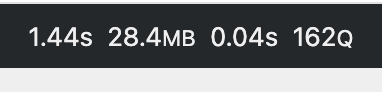
I’ve already tried that. As soon as I activate WooCommerce main plugin everything slows down.
Query Monitor Before activating WooCommerce plugin

---
### Author:  [@Caleb](https://techoforum.com/u/Caleb)
#### Post date: [November 30, 2024, 5:43pm UTC](https://techoforum.com/t/woocommerce-slow/410/13 "2024-11-30T17:43:59Z")
Query Monitor After activating WooCommerce plugin
---
### Author:  [@Caleb](https://techoforum.com/u/Caleb)
#### Post date: [November 30, 2024, 5:45pm UTC](https://techoforum.com/t/woocommerce-slow/410/14 "2024-11-30T17:45:49Z")
Above is for the dashboard loading.
---
### Author:  [@technuisance](https://techoforum.com/u/technuisance)
#### Post date: [November 30, 2024, 5:53pm UTC](https://techoforum.com/t/woocommerce-slow/410/15 "2024-11-30T17:53:09Z")
Can you add following line in wp-config.php and try
`define( 'WP_MAX_MEMORY_LIMIT', '1024M' );`
---
### Author:  [@Caleb](https://techoforum.com/u/Caleb)
#### Post date: [November 30, 2024, 5:54pm UTC](https://techoforum.com/t/woocommerce-slow/410/16 "2024-11-30T17:54:07Z")
Just tried, no significant improvement at all.
---
### Author:  [@Guru](https://techoforum.com/u/Guru)
#### Post date: [November 30, 2024, 5:55pm UTC](https://techoforum.com/t/woocommerce-slow/410/17 "2024-11-30T17:55:48Z")
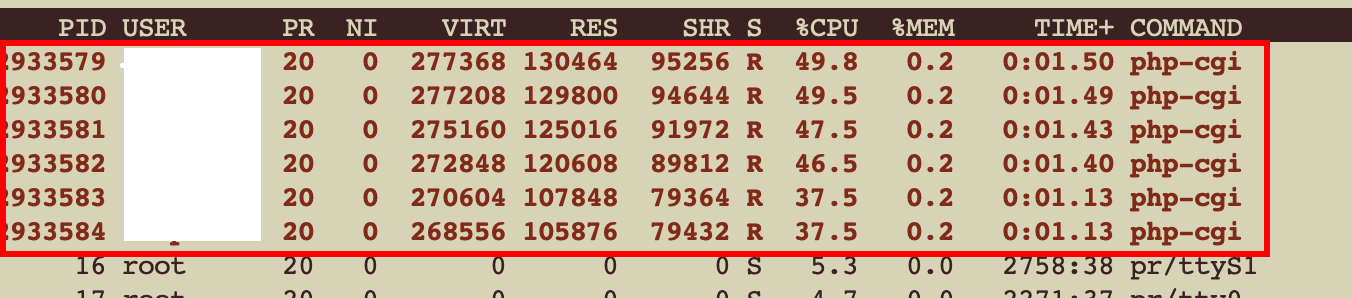
Can you login into your dedicated server via ssh and run top command or htop.
Keep the terminal window opened on the left side and on the right side open a browser and go do the dashboard. When WordPress dashboard loads observe the top/htop to find out what is going on. Report back here.
---
### Author:  [@Caleb](https://techoforum.com/u/Caleb)
#### Post date: [November 30, 2024, 5:57pm UTC](https://techoforum.com/t/woocommerce-slow/410/18 "2024-11-30T17:57:35Z")
This account takes up almost 50% of the CPUs when dashboard is loaded. Similar pattern is observed when frontend is loaded.
---
### Author:  [@Guru](https://techoforum.com/u/Guru)
#### Post date: [November 30, 2024, 6:01pm UTC](https://techoforum.com/t/woocommerce-slow/410/19 "2024-11-30T18:01:18Z")
Ok so we are getting closer to find the root cause of problem. WooCommerce is frying up your server. Problem is not with anything else but with WooCommerce plugin itself. It seems to be very poorly written.
Go to [WooCommerce support](https://wordpress.org/support/plugin/woocommerce/) and ask them to fix it.
---
### Author:  [@Guru](https://techoforum.com/u/Guru)
#### Post date: [November 30, 2024, 6:02pm UTC](https://techoforum.com/t/woocommerce-slow/410/20 "2024-11-30T18:02:32Z")
Go to github and report the problem there too
> **[GitHub - woocommerce/woocommerce: A customizable, open-source ecommerce platform...](https://github.com/woocommerce/woocommerce)**
>
> A customizable, open-source ecommerce platform built on WordPress. Build any commerce solution you can imagine.
[Next page](https://techoforum.com/t/woocommerce-slow/410.md?page=2)